Challenge Details
Linux for DevOps Engineers
By Aleksandro Matejic · July 26, 2026

This course is for engineers who use Linux every day and still feel the gaps. It is built around a lab on your own machine, so every command in it is one you run.
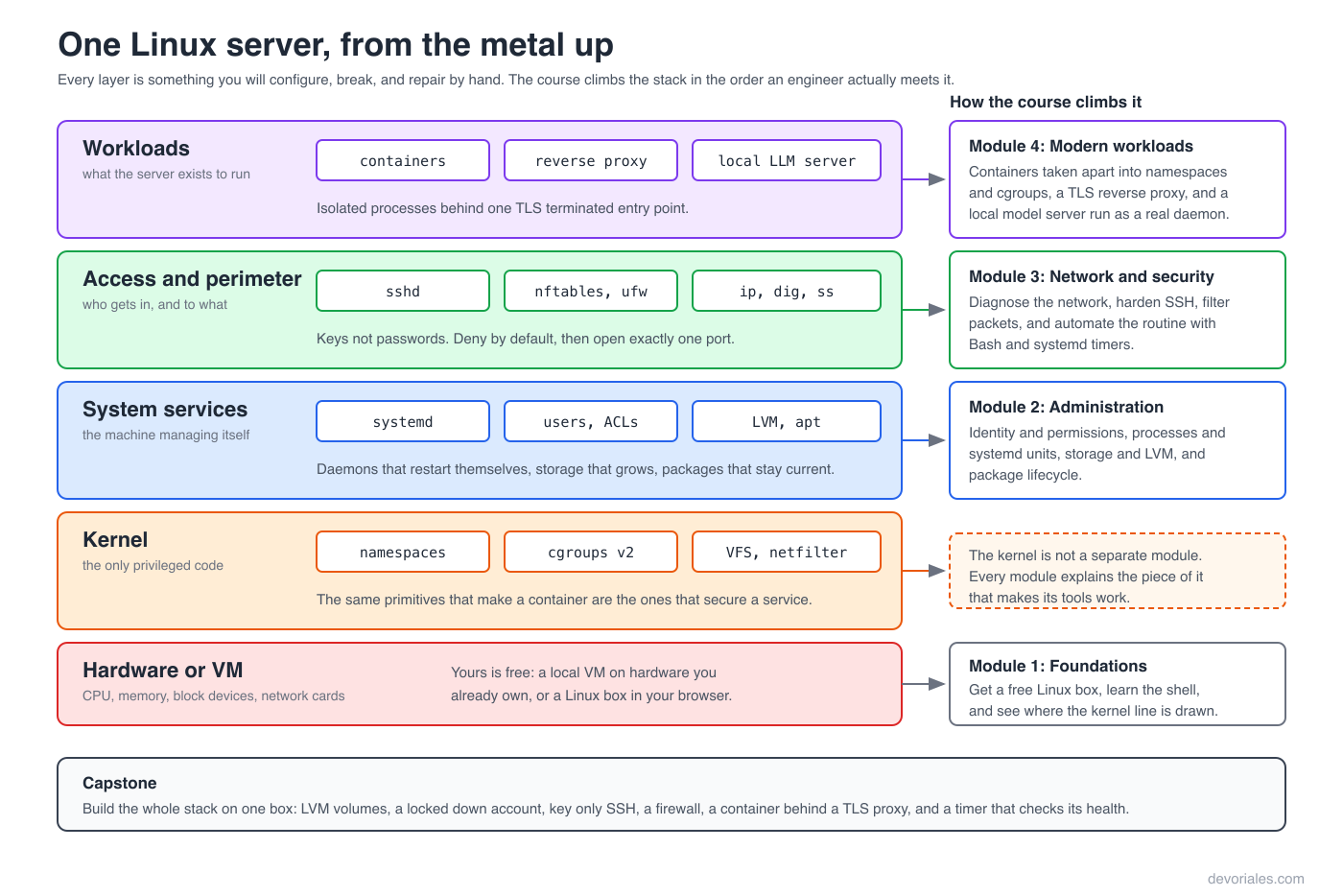
You finish having built a hardened application gateway: LVM backed storage, a locked down SSH configuration, firewall rules you wrote yourself, a reverse proxy terminating TLS, and a local LLM server running as a managed systemd service. It runs on hardware you already own, and it costs nothing.
What you'll learn:
- Build a free Linux lab on your own machine: a container, and a VM with real spare disks (Ubuntu 24.04)
- See what a program asks the kernel to do, and why deleting a huge log frees nothing (strace, inodes)
- Turn a web server log into an answer, and edit a config without fighting the editor (grep, sed, awk, vim)
- Give the right people the right access, and work out why someone cannot get in (permissions, sudo, ACLs)
- Keep services running, and find out why one died (processes, signals, /proc, systemd units)
- Resize a full disk without downtime (LVM, ext4, xfs)
- Install and upgrade software without breaking the system (apt, dpkg, pinning)
- Get back into a machine that will not boot (boot chain, rescue mode)
- Work a "the box is slow" report down to what is actually saturated (a repeatable triage ladder)
- Find why the network is broken, from a dead interface to slow DNS (ip, ss, dig, tcpdump)
- Lock down remote access and close ports you did not mean to leave open (SSH keys, sshd_config, nftables, UFW)
- Automate what you keep doing by hand, and keep logs, clocks and disks in check (Bash, cron, timers, journald)
- Understand what a container really is, and what changes when the OS is immutable (namespaces, cgroups v2, overlayfs)
- Put a real service online safely, and run a local LLM and CI runner as services (reverse proxy, TLS, Ollama)
How the course is structured:
26 lessons across five modules that build in order: foundations and the terminal, core system administration, networking and security, modern infrastructure, then a capstone that assembles the whole thing into one hardened gateway. Every module closes with a free hands on lab that runs in your browser on Killercoda, with checks that verify your work rather than just showing you the answer. Lessons are released module by module.
Requirements:
- A macOS, Windows, or Linux machine with a few gigabytes of free disk space
- Docker, OrbStack, or UTM on macOS, or WSL2 on Windows. All free, and the first lesson sets one up with you
- Willingness to work in a terminal. Comfort with it is what the course is for
- No prior Linux experience needed, and nothing to pay for: no cloud VPS, no subscription
Who this course is for:
- Developers who deploy to Linux servers and want to understand what they are deploying onto
- DevOps and platform engineers who learned Kubernetes before they learned the operating system underneath it
- Support and SRE staff who need to diagnose a production box under time pressure
- Anyone who picked up Linux from scattered blog posts and wants a structured path
💡 This is an interactive, text-based course. We build our material this way because reading and doing is simply the most effective way to master engineering tools.
Video tutorials make it easy to drift off or fall into passive watching. A text-first approach keeps you active: you control the pace, scan code without scrubbing timelines, and apply commands immediately in hands-on environments.
Lessons: 26
Time Limit: No time limit
Ready to start this course?
Create a free account to track your progress and earn points.
Course Lessons
Linux Foundations 5 lessons
1. Lesson 1.1: Building Your Free Linux Environment Let's go straight to the point. You cannot learn Linux from just...
1 ptsThese are two different sources of information. lsblk builds its output by reading /sys, which is mounted inside the container and describes the host's hardware, so the disks appear in the listing. Actually operating on a disk requires opening its device node in /dev, and the container was never given those nodes. Seeing a device and being permitted to open it are separate things, which is precisely the isolation a container is built to provide. No reinstall or unmount changes this, and fdisk handles virtual disks such as vda perfectly well. The fix is not a command but an environment: partitioning and LVM need a real virtual machine with its own attached disks.
2. Lesson 1.2: The Linux Ecosystem and Kernel Architecture Ask ten engineers to define Linux and you’ll get ten...
1 ptsThe two containers print the same kernel release because there is only one kernel involved. A container image carries a filesystem and a userland, not a kernel: ls /boot in either image is empty and neither has a linux-image package installed. Every system call from either workload is served by the host's running kernel, so patching the host to 6.8.0-52 fixes both at once and nothing an application team does inside an image can change that number. B inverts the model and describes a virtual machine, which does boot its own kernel. C confuses the userland with the kernel; the 22.04 release is older, but kernel exposure here is identical because the kernel is shared, and that is precisely what the matching output demonstrates. D reads a correct result as a bug: agreement between the two is the expected signature of a shared kernel, not a caching artefact.
3. Lesson 1.3: The Filesystem, Inodes, and Getting Around Every Linux system you touch has the same shape....
1 ptsFree space and free inodes are tracked separately. Inodes are allocated when the filesystem is created, and each file consumes one regardless of how small it is, so a directory full of millions of tiny files can exhaust the inode table while the disk itself stays largely empty. The kernel reports that condition with the same No space left on device error used for a full disk, which is why the message and df -h appear to contradict each other. df -i shows the inode count directly and settles it in seconds. du walks filenames and would report the same low usage, and while a read only remount also breaks writes, it produces Read-only file system rather than a space error.
4. Lesson 1.4: Text Processing and the Shape of a Pipeline Linux keeps almost everything in plain text. Configuration,...
1 ptsA is supported by the requested paths themselves: /wp-login.php, /.env, /.git/config, and /.aws/credentials are a scanner's checklist, not a shopper's browsing history. B follows from the failures spanning three distinct client addresses on one endpoint; a fault affecting unrelated clients identically is server side, whereas a single client failing repeatedly would suggest a client problem. C is the most useful detail in the output, because 403 Forbidden and 404 Not Found mean different things: the 403 confirms /server-status exists and is protected, while the 404 paths do not exist at all, and that difference tells both the scanner and you where the real attack surface is. D is wrong because /.env returned 404, so nothing was retrieved and there is nothing to rotate. E is wrong because a user agent is a request header the client chooses freely; a scanner that finds itself blocked simply sends a different string, so user agent filtering is a speed bump rather than a control.
5. Lab Lesson 1.5: Module 1 Lab (Killercoda) This is a hands-on interactive lab hosted on Killercoda. You will investigate...
1 ptsCore System Administration 7 lessons
6. Lesson 2.1: Identity, Permissions and Access Control Every file operation on a Linux system ends with the kernel...
1 ptsA is the actual cause and the one most often missed. /srv/analytics is drwxr-x---, owned by analytics with nothing for other, and tokafor is neither the owner nor in that group, so he cannot traverse the directory. Path resolution fails before the kernel ever looks at collector.log, which is why a file whose ACL clearly names him still returns Permission denied. B is how you detect the situation: the mode column reads -rw-r----- and would suggest no access for him, so the trailing + is the only visible sign that extra rules exist and getfacl is needed to see them. C reads the #effective: annotation correctly: the entry says rw-, the mask caps every named entry at r--, and the effective result is read only, which is exactly the trap where an ACL appears to grant something it does not. D is wrong on two counts: it would not fix the traversal problem, and it grants him everything else that group owns rather than access to one file, which is the opposite of minimal. E misreads the failure, because other on the file is not what is blocking him, and loosening it would publish the log to every account on the machine while still leaving the unreadable parent directory in the way.
7. Lesson 2.2: Process Lifecycle and Service Orchestration A running Linux system is a tree of processes descended from...
1 ptsSIGKILL cannot be caught, so the process died without a clean exit, and systemd recorded code=killed, status=9/KILL. That counts as a failure, Restart=on-failure is the standing instruction to recover from failure, and RestartSec=2 is why it took two seconds. Everything behaved exactly as configured, which is the point: killing the process fights the service manager instead of using it. systemctl stop is the correct action, because it sends SIGTERM to the whole cgroup, waits for a clean shutdown, and marks the unit as intentionally stopped so no restart is scheduled. B misreads what SIGKILL does, since the new Main PID is a fresh process started by systemd rather than the old one surviving. C is wrong because Restart= governs the whole lifetime of a running unit, not only boot, and the restart counter is at 1 line records a restart within this boot. D confuses two separate mechanisms: reparenting to PID 1 applies to orphaned children and never restarts anything, and disable only removes the boot-time symlink, which would not have stopped a restart happening right now.
8. Lesson 2.3: Storage Architecture and LVM A disk is not a filesystem, a filesystem is not a mount point, and a mount...
1 ptsA is the whole diagnosis. lvextend resized the block device and nothing else; a filesystem records its own size at creation and does not re-examine the device underneath it, so df correctly reports the old figure until xfs_growfs is run against the mount point. B follows from arithmetic on the pvs output: the two PVs are 1020 MiB and 520 MiB, so a 1.4 GiB volume cannot fit on either alone, and PFree 0 on /dev/vdb shows it was filled before allocation continued onto the second device. C is what makes this safe to do on a live system, and findmnt confirms the filesystem is xfs and currently mounted; xfs can only be grown online, since it has no offline grow path at all. D is wrong and would cause needless downtime. E is the dangerous one: xfs cannot be shrunk by any means, so an oversized xfs volume can only be reduced by creating a smaller filesystem and restoring the data into it, which is exactly why choosing xfs is a commitment to only growing.
9. Lesson 2.4: Software Lifecycle Governance Installing software is the easy part. Knowing which version you will get,...
1 ptsapt upgrade will only move already-installed packages to newer versions. It will never install a package that is not present or remove one that is. A kernel upgrade does neither of those things to the running kernel: it installs a new package whose version is part of its name, so the previous kernel stays on disk and remains bootable if the new one fails. Because that requires installing a new package, upgrade declines and reports it as kept back, week after week, exactly as configured. full-upgrade permits the new package, and the new kernel only takes effect after a reboot, which is what /var/run/reboot-required exists to flag. B is ruled out by the output itself: apt-mark showhold returns nothing, so no hold is involved, and "kept back" has two distinct causes that this pair of commands separates. C is contradicted by apt-cache policy, which reads the downloaded index and is naming a specific available version, 6.8.0-51.51. D describes a lock conflict, which would produce an error about the dpkg frontend lock rather than a clean "kept back" list, and unattended-upgrades is in any case restricted to security origins and has the same refusal to install new packages.
10. Lesson 2.5: Boot, Recovery, and Getting Back Into a Broken Machine The capstone asks you to add a line to...
1 ptsA is the mechanism, and it is worth being precise about because it is invisible unless you go looking: systemd never mounts /etc/fstab directly. systemd-fstab-generator turns each line into a .mount unit at boot and symlinks it under local-fs.target.requires, unless nofail is present, in which case it goes under local-fs.target.wants. A failed Requires= dependency fails the target, and a failed local-fs.target sends systemd to emergency.target, whose entire dependency list is emergency.service and grub-initrd-fallback.service. sshd is simply never reached. B follows directly and is the one-word fix. C is the habit that makes the whole failure avoidable: findmnt --verify names the unreachable source in advance, and mount -a exits 32 rather than 0 on an entry it cannot satisfy, so both the interactive check and a scripted one would have caught it. D inverts what the reset means: a running sshd rejecting a key produces an authentication failure after a successful protocol exchange, whereas kex_exchange_identification: read: Connection reset by peer means nothing was listening to complete the handshake, which is the hypervisor's forwarded port accepting a connection to a service that does not exist. E confuses the virtual machine with the operating system running inside it: the hypervisor reports the VM process, which is alive and idling at an emergency prompt, and says nothing about whether the guest finished booting.
11. Lesson 2.6: Performance Triage, a Ladder for "The Box Is Slow" "The box is slow" is not a diagnosis. It is a report...
1 ptsEvery number in that output points at storage. Linux load average counts processes in state R and state D, and the b column, which is exactly the count of processes blocked on I/O, sits around 33, accounting for essentially the whole load figure. Meanwhile r is 1, so almost nothing is queued for CPU, and us plus sy totals about 5%: the processors are doing nothing. wa at 84% is the confirmation, since that is CPU time spent idle specifically because it is waiting for I/O to return, and bi around 4000 blocks per second shows the reads that are not keeping up. B is the trap the engineer fell into, treating load average as a CPU queue when it is not; adding cores to a machine whose cores are 85% idle changes nothing. C misreads free -h in the way rung 2 exists to prevent: free of 402 MiB looks alarming, but buff/cache is 6.0 GiB of reclaimable page cache and available is 11 GiB, so the machine has ample memory, and si/so of zero confirms it is not swapping. D reads the r column correctly and draws the wrong conclusion from it, since a low r alongside a high load is not an artefact but the signature of the D state processes that make this an I/O problem. The next rung is iostat -x, watching aqu-sz and await rather than %util.
12. Lab Lesson 2.7: Module 2 Lab (Killercoda) This is a hands-on interactive lab hosted on Killercoda. You take over an...
1 ptsNetworking and Security 6 lessons
13. Lesson 3.1: Network Operations and Diagnostics "The site is down" is not a diagnosis. It is a report that something...
1 ptsss states the whole case: the listening socket is 127.0.0.1:9095, not *:9095, so the process only accepts connections arriving over loopback. A request from 10.20.0.7 reaches the host on eth0, finds no socket bound to that address, and the kernel answers with RST, which is exactly what the capture shows. The curl result is the trap: testing from the box itself goes over loopback, matches the bind, and returns 200, which is why "I checked with curl on the server" proves less than it appears to. B is ruled out by the RST itself, because a firewall configured to DROP produces silence and a repeated SYN with no reply, not an immediate reset; a REJECT rule would more typically return an ICMP unreachable. C misreads the capture, which shows the packets arriving at the correct host address, so name resolution worked. D is contradicted by the same capture: the kernel is actively resetting connections, which requires a running host, and a crashed service would leave no listening socket for ss to report at all.
14. Lesson 3.2: Secure Shell Infrastructure SSH is the door to every machine you administer, which makes it the thing...
1 ptsA is the whole risk and the reason agent forwarding is discouraged on shared hosts. The forwarded socket is a live channel back to the engineer's agent, so anybody who can open it can request signatures and authenticate as them anywhere the key is trusted, with nothing to steal and nothing left behind on the bastion. B is the fix: ProxyJump uses the bastion purely to relay an encrypted connection, and the authentication to the final host is performed by the engineer's own machine, so the bastion never handles credentials at all. C is the precise version of what forwarding exposes, and it matters because "the key is never copied" is often offered as reassurance when the ability to sign is exactly what authentication requires. D misunderstands what the passphrase protects: it encrypts the private key at rest, and the agent already holds the decrypted key, so a forwarded agent signs without any passphrase being involved. E is wrong because file modes do not constrain root, which can open any socket on the system regardless of owner or permissions, and on a bastion with several sudo users that is not a hypothetical.
15. Lesson 3.3: Perimeter Hardening and Firewalls A firewall is the one piece of configuration that can end your access...
1 ptsA stateful firewall has to recognise return traffic. When this host sends a DNS query or an HTTPS request, the reply comes back as an inbound packet, typically to a high numbered ephemeral port that no rule mentions, so with policy drop and no connection tracking rule it is discarded. Outbound requests leave fine, which is why the output chain looks innocent, and inbound SSH works because port 22 is explicitly allowed, which is exactly what makes this so confusing to diagnose. The rising counter on the policy line is the evidence: something is being dropped in volume. ct state established,related accept belongs at the top of the input chain and fixes all of it at once. B misreads the direction of the problem, since an accept output policy means outbound traffic is not being filtered at all. C describes a rule model that does not apply here: the outbound request is governed by the output chain, which accepts everything, and adding output rules would change nothing. D confuses the symptom with the cause; reject would turn the hangs into immediate errors and make the fault easier to spot, but the traffic would still be blocked and the host would still be unable to resolve DNS.
16. Lesson 3.4: Essential Systems Automation with Bash Most operational Bash is written once, under time pressure, and...
1 ptsTwo independent problems combine, and both are the point of this lesson. In a pipeline without pipefail, the exit status is that of the last command, so if pg_dump fails the still-successful gzip compresses an empty stream, produces a small archive, and returns zero. set -e sees a successful pipeline and lets the script continue to echo "backup complete", so the script actively reports success. That is the failure. Why it went unnoticed is the second half: cron keeps no record of whether a job succeeded, and its only notification path is mail to a local user that nobody reads, so a job failing every night for eight months looks exactly like one that works. A systemd timer would have marked the unit failed, recorded status=1/FAILURE in the journal, and surfaced it in systemctl --failed. B inverts what set -e does, which is stop at an error rather than before one, and the empty directory shows the script did run. C is wrong because a shebang line governs which interpreter runs a script executed by path, and cron's SHELL only affects the command line in the crontab; the dash issue is real but it applies to bash syntax written directly in the crontab entry, not here. D is wrong because cron runs the command through a shell that performs command substitution normally, and overwriting would still have left one archive rather than none.
17. Lesson 3.5: Logs, Time, and Disk Growth Every failure in this course so far announced itself. A service stopped, a...
1 ptsThe evidence names the cause precisely. app.log is zero bytes and dated 10 July, which is the day of a rotation, while app.log.1 is four gigabytes and was modified seconds ago: the file that is supposed to be historical is the one still being written. lsof closes it, showing PID 1044 holding file descriptor 4 open for writing (4w) on that inode. This is the default create behaviour interacting with a process that never reopened its log: rotation renamed the inode, and the descriptor followed the inode rather than the name, exactly as Lesson 1.3 established. The fix is to make the service reopen after each rotation with a postrotate script running a reload or sending SIGHUP, or, when the software cannot be signalled, to switch the rule to copytruncate so the original inode keeps its name. B misreads the symptom: only one uncompressed old file exists and the rule has not yet reached seven, so retention is not the problem, and raising it would keep more of them. C is wrong on mechanics, since create 0640 app app makes the new file owned by app, which is exactly right, and ownership would produce write errors rather than a silently empty file. D inverts the situation: nothing is deleted, both files are present and linked, and removing app.log.1 while it is held open would free the space only after the process closes it, leaving the service writing into a file with no name and the same failure repeating at the next rotation.
18. Lab Lesson 3.6: Module 3 Lab (Killercoda) This is a hands-on interactive lab hosted on Killercoda. A load balancer says...
1 ptsModern Infrastructure 6 lessons
19. Lesson 4.1: Container Primitives and Engines A container is not a lightweight virtual machine. It is an ordinary...
1 ptsThree pieces of evidence point at one cause. Exit code 137 is the shell convention of 128 plus the signal number, and 9 is SIGKILL, so the process was killed rather than exiting on its own. memory.max is 268435456 bytes, which is 256 MiB, and it is a ceiling the cgroup enforces, not a measurement. memory.events then records the consequence directly: oom_kill 12 means the kernel killed a process in this cgroup twelve times, matching the restart count, while max 1834 shows the limit was hit and reclaim attempted far more often than that. The application logs end mid-request precisely because SIGKILL cannot be caught, so nothing gets a chance to log a shutdown. The fix is to raise the limit or reduce what the application holds in memory, not to change the code that appears to stop mid-request. B is wrong because oom_kill is incremented only by the kernel's out-of-memory killer acting on this cgroup, not by ordinary abnormal exits. C describes a real mechanism, but an engine-initiated stop would follow a stop request and would not increment oom_kill at all. D inverts the meaning of the file: current usage is memory.current, and memory.max is the limit.
20. Lesson 4.2: Reverse Proxies and Web Services Lesson 3.1 ended with a service bound to 127.0.0.1:9095, unreachable...
1 ptsThe proxy terminates the client connection and opens its own connection to the backend, so from the application's point of view the client genuinely is 127.0.0.1. Nothing is lost or rewritten; that is simply what happened at the TCP level. The fix has two halves and both are required. The proxy must pass the original address on, conventionally in X-Forwarded-For along with X-Forwarded-Proto and the original Host. The application must then be told to trust those headers only when the connection comes from the proxy, because any client can set X-Forwarded-For itself, and an application that trusts it unconditionally lets anyone forge their apparent source address and defeat exactly the rate limiting and audit logging this fix was meant to restore. B misidentifies the mechanism and proposes passthrough, which would abandon the reason for terminating TLS at the edge and still not give the backend a different peer address. C describes something bind addresses do not do: binding governs which addresses a socket accepts connections on, and does not alter the source address of a connection that arrives. D changes a limit rather than the identity being counted, so the rate limiter would still see one client and the audit log would still be wrong.
21. Lesson 4.3: Local AI Infrastructure Execution An inference server is a daemon. It listens on a port, holds a lot of...
1 ptsThe evidence is unambiguous and all points the same way. oom_kill 12 means the kernel killed the service twelve times, and NRestarts=12 matches exactly, so Restart=always has been bringing it back each time. Every request in flight at the moment of a kill is dropped, which is precisely the "connections closed mid-response" the application log shows. Monitoring missed it because /api/version is answered by the process the instant it starts and says nothing about whether a model can be loaded or a token produced; between kills the service is genuinely up, so a check on that endpoint passes. A health check that performs an actual generation, as this lesson builds, would have failed during those windows. The high 4211 line is also worth reading: the soft limit was hit far more often than the hard one, so the service spent a great deal of time under reclaim pressure before each kill, and raising MemoryMax is the real fix. B misreads the role of swap; allowing a multi-gigabyte model to swap produces a service that is alive and unusably slow rather than one that is correct, and it would not prevent the hard limit being reached. C is wrong on the mechanism, since CPU throttling is recorded in cpu.stat and never increments oom_kill, which only the memory controller's OOM killer does. D changes the frequency of a check that cannot detect this failure at all, so it would produce the same clean week of green.
22. Lesson 4.4: Immutable and Container-Oriented Linux Every lesson up to this one has taught you to log in and fix...
1 ptsA is the operational point. Patching an immutable node is not an in-place package upgrade; it is a new system image, declared in the machine config and applied through the API, after which the node reboots onto it. Nothing in the engineer's plan has a mechanism behind it: there is no sshd to configure, no shell for a login session to land in, and no package manager to run. B is the internal consistency of the design rather than a coincidence: /etc/passwd exists to answer "who may log in and as what", and on a node with no login path there is no question to answer, which is why the absent shell and the absent account database appear together. C is the decision the whole distribution is organised around, and reading it as a missing feature is the most common misunderstanding of this model: the fixed set of RPCs (read, list, logs, dmesg, mounts) is the complete diagnostic surface, deliberately, so that no operation exists which could run arbitrary code on the host. D inverts how these processes run: they are supervised directly by Talos's init and run as containers under containerd, and a UID does not require an entry in /etc/passwd to be valid, since that file is a name-to-number lookup for humans and tools, not a kernel permission structure. E is contradicted by the node itself, where /proc/1/comm reports init and /proc/1/cmdline reports /sbin/init: Talos ships no systemd binary, no systemctl, and no journalctl, and machined is the core service that supervises the others rather than a unit being supervised by systemd.
23. Lesson 4.5: CI Runners as a Linux Service Here is the honest description of a self-hosted CI runner, and it is worth...
1 ptsThe escalation has nothing to do with how well the runner itself is confined, which is what makes it so easy to ship by accident. /var/run/docker.sock is the full API of a daemon running as root, and that API includes starting a container with an arbitrary bind mount and an arbitrary user. Writing to that socket therefore means asking a root process to act on your behalf, which is why docker group membership is equivalent to root on the host. Critically, the container the daemon starts is its child, not the runner unit's, so it inherits none of ProtectSystem, ReadWritePaths, NoNewPrivileges or the cgroup limits: those constrain the cirunner process, and the work is being done somewhere else entirely. B names real directives that do not address the mechanism, since nothing is being accessed through a device node or a kernel module, and the host filesystem arrives by bind mount. C misreads the scope of the sandbox rather than the sandbox failing: the runner process genuinely cannot write to /etc, which the lesson demonstrates directly, and the container is simply not covered by it. D invents a dependency that does not exist, as NoNewPrivileges restricts gaining privileges through setuid execution and has no bearing on an image pull. The fix is to stop granting socket access at all: a rootless engine maps container UID 0 to the unprivileged service account, and the identical command then returns Permission denied.
24. Lab Lesson 4.6: Module 4 Lab (Killercoda) This is a hands-on interactive lab hosted on Killercoda. You will build a...
1 ptsLinux Capstone Project 2 lessons
25. Capstone: Production-Grade Hardened Application Gateway The situation A four person team has been running their...
1 ptsThree things combined, and each is individually survivable. A is the root cause: on Ubuntu 24.04 ssh is socket-activated, so systemd owns the listening socket and sshd is started on demand. A generator copies Port directives into ssh.socket, but restarting the ssh service leaves the socket untouched, which is why the daemon reports 2222 while the kernel shows only *:22. B is the discipline that catches it: sshd -T reports what the configuration resolved to, and says nothing about whether a socket exists, so verification has to look at the system rather than the config. C is what turned a harmless misconfiguration into a lockout: the firewall closed the one port that was genuinely listening, and accepted a port nothing was bound to. D is the trap: sshd -t validates syntax only, and it passed here precisely because the configuration was correct and simply never took effect. E is wrong, and its wrongness is the lesson: an established SSH session is an already-accepted socket, and both the connection tracking rule and the fact that the listener is separate from the connection mean it survives a firewall change and a socket restart. Keeping that session open, and testing the new port from a second one before closing the first, would have turned this into a thirty second fix.